How it works

How Fornax works, start to finish

No sales calls you didn't ask for, and no website editor to learn. Here is exactly what happens, from the first look at your demo to the day your site goes live, and what you get after that.

Two ways in

Whichever way you found us, it ends the same way

Some people get a demo from us before they've heard of Fornax. Others find us first. Here's where each path starts.

Got our email?

Your demo is already built

The email we sent you links to a real website built for your business, from your name, trade and service area, plus a preview of your dashboard. It's ready to go live when you are.

  1. Open the demo link and look around, on your phone or computer.
  2. Like it? Reply yes, and we send you a Client ID.
  3. Enter the Client ID at checkout with your email address.
Have a Client ID?

New here?

It starts with a short conversation

Tell us about your business in a short form. The rest happens by email, at your pace. Nothing gets built live on this site, and nothing is charged.

  1. Fill in a short form about your business.
  2. Our AI assistant emails you a couple of quick questions.
  3. Once it has what it needs, it emails you your demo.
Tell us about your business

Both paths lead to the same place: a demo of your own site, and a Client ID when you say yes.

The four steps

From first look to live site

Four steps, and you're only asked to pay at the third one.

  1. Step 1: We build your site first

    We build it from your business name, trade, service area and logo. Before you see it, it passes automated accessibility and speed checks. Got our email? This step is already done.

  2. Step 2: You see it, with your dashboard

    Your demo is your actual site plus a preview of the dashboard that comes with your plan. We set the plan from your business size and needs, so you see the price before you decide. The demo stays open for 30 days.

  3. Step 3: Say yes and check out

    Reply yes and we send you a Client ID. Enter it at checkout with your email address, choose Managed or Offboard, and pay. Nothing is charged before this step.

  4. Step 4: You're live

    On Managed, your site is live on its Fornax address in under a minute after payment. If you bring your own domain, it follows once the domain is pointed. On Offboard, you take the domain and the site files.

Who does what

Our AI assistant
Builds demos and sends first replies. In your dashboard, automated steps are marked.
Tyler, the founder
Handles anything the assistant can't. Billing questions go to him.
You
Look at your site, ask us anything, and decide. You pay only if you want it.

Your Client ID

A private code that opens your checkout

When you reply yes to your demo, we send you a Client ID. It's how checkout knows which site, plan and price are yours.

  • It only works with your email address

    Only someone with both your Client ID and your email address can open your offer.

  • Your plan and price are already on it

    Checkout shows the plan we matched to your business. The price may reflect a discount you already agreed on.

  • Can't find yours?

    It comes in our reply after you say yes. Still stuck? Email support@fornaxopsuites.com and we'll help you find it.

Illustration. Checkout starts with two things: your Client ID and the email address we wrote to. Both have to match before your offer opens.

Managed or Offboard

One site. Two ways to run it.

At checkout you choose how you want to run your site. Managed means we host it and keep it running. Offboard means you pay once, take the files and host it yourself.

One site, two paths: Managed, where we run it for you, or Offboard, where you take the keys.
Your site, built for your business

Managed

We run it

From $149/mo

Offboard

You take the keys

From $499 once

Managed and Offboard, side by side
Managed Offboard
How you pay Monthly, or yearly with 2 months free Once
Micro price Solo operators and two-person shops $149/mo, or $1,490/yr $499 once
SMB price Shops with 3–20 employees $249/mo, or $2,490/yr $799 once
Hosting Included: hosting, SSL (the padlock in the address bar) and security updates Yours to arrange
Dashboard and lead inbox Included: lead inbox, edits and (on SMB) CRM sync Not included
Your domain Bring your own domain and it stays registered to you, or use a Fornax address You take the domain and the site files
Support Email support None after handoff. You get written docs and videos.
Code and files We keep the site running; code and hosting stay with us Handed to you

These are founding-client prices, locked in for as long as you stay. Your checkout price may reflect a discount you already agreed on. Full pricing and refund terms.

Monthly
Cancel anytime. Monthly plans have a 30-day pro-rata refund.
Yearly
Pay for 10 months, get 12. One payment, non-refundable and not prorated. Access stops when you cancel.

Waitlist Mid-Market (multi-location and larger operations): $399/mo, $3,990/yr, or $1,299 once. Waitlist only for now.

Going live

Live in under a minute after you pay

On Managed, there's no launch call and no waiting on a web designer. Payment is the last thing you do.

  1. You check out

    Choose Managed or Offboard and pay. On Managed, your dashboard login arrives by email. On Offboard, you take the domain and the site files and host them yourself.

  2. On Managed, your site is live on its Fornax address

    In under a minute after payment. You can share the link that day.

  3. Your own domain, when you're ready

    "Pointing" your domain is a one-time settings change where your domain is registered. Once it's pointed at the new site, your site goes live there too. Your old site stays up until then. If you bring your own domain, it stays registered to you.

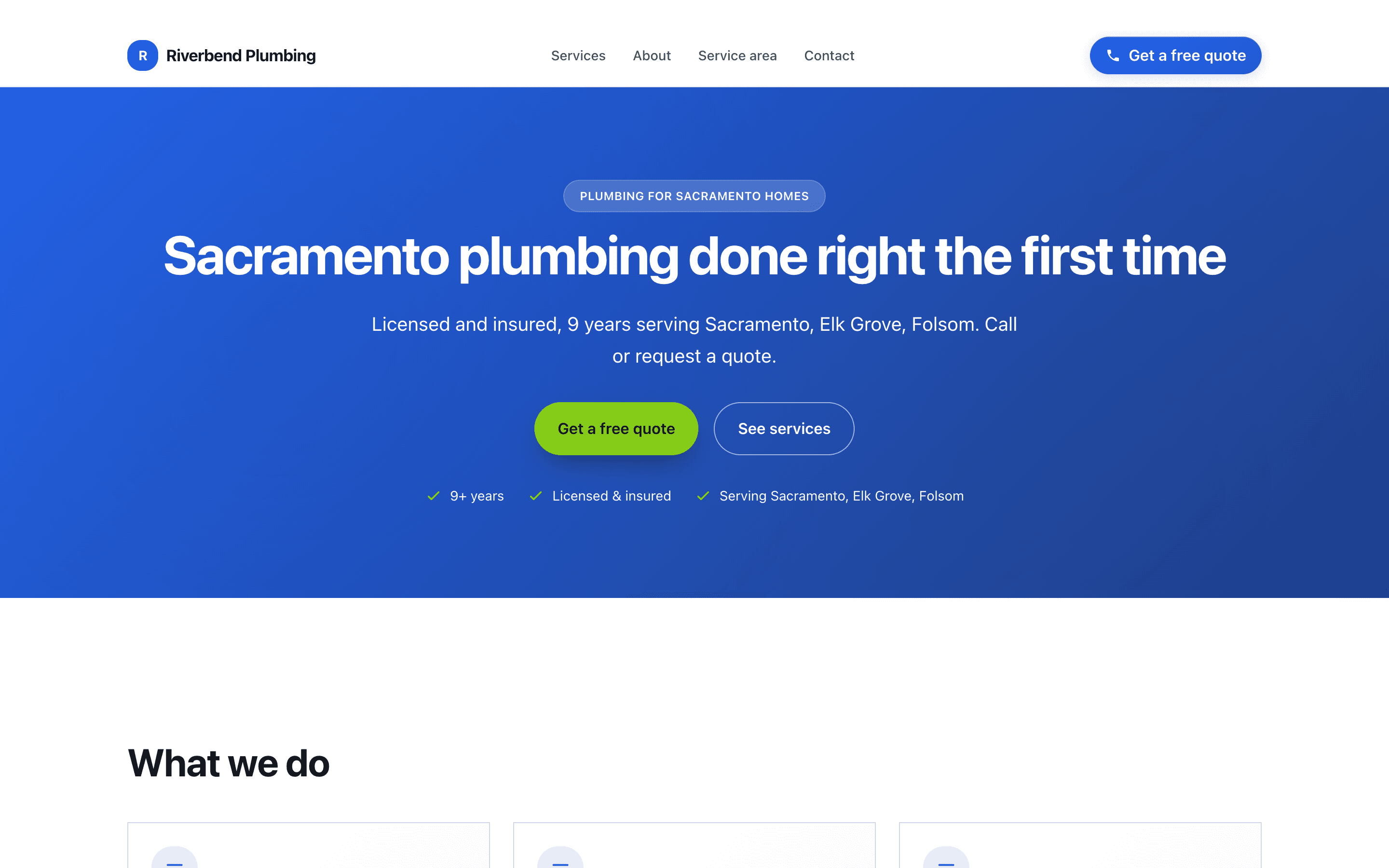
Home page of Riverbend Plumbing, a fictional sample business built by Fornax: a blue hero reading 'Sacramento plumbing done right the first time' with quote and services buttons.

Fictional business Riverbend Plumbing is a sample. The site is real Fornax output; the web address shown is a placeholder.

After launch

What you get once it's live

On Managed, the site runs in the background and every request comes to you.

We don't promise a number of leads. What comes in depends on your market.

  • Leads come straight to you

    Every request from your site lands in your email and in your dashboard's lead inbox. Download them as a spreadsheet (a CSV file) whenever you want.

  • CRM sync on SMB

    Automated

    A CRM is the software you keep customer records in. On SMB, new leads are also copied into HubSpot automatically, one way: leads go in, nothing comes back. HubSpot is the one CRM at launch; Jobber, ServiceTitan, Housecall Pro and Successware are planned.

  • Edits from your dashboard

    Change your service text, contact info, hours, logo and photos from your phone or computer. On SMB you can upload more photos, for your services and team.

  • Hosting handled

    Hosting, SSL (the padlock in the address bar) and security updates are ours to worry about. You never open a website editor.

  • One address for everything else

    Email support@fornaxopsuites.com. Our AI assistant replies first, and Tyler handles anything it can't. Replies within 24–48 hours.

Our rules

What we never do

Plenty of trades owners have been burned by web companies before. These are the lines we don't cross.

  • Promise a number of leads.

    What comes in depends on your market and on search engines. We build and run the site that captures them.

  • Show fake reviews, testimonials or customer results.

    Our sample sites are fictional businesses, and we label them that way everywhere they appear.

  • Charge you before you've seen your site.

    No free trial. You see the real thing first, then decide.

  • Sell you something that isn't built yet.

    Anything that isn't ready is marked Planned, including the CRMs we don't connect to yet.

  • Take over your domain.

    If you bring your own domain, it stays registered to you. On Offboard, you take the domain and the site files.

  • Hide the terms.

    Every refund rule is on the Pricing page, in plain words.

Ready to see your own site?

Tell us about your business. Our AI assistant asks a couple of quick questions, then emails you a demo built for you. No cost to look, and you pay only if you want it.